


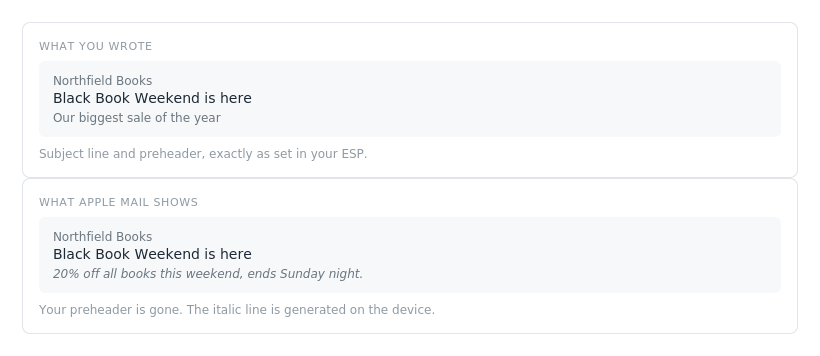
You spend time on a subject line. You write a preheader that earns the open. Then the mail client throws the preheader away and writes its own line instead.
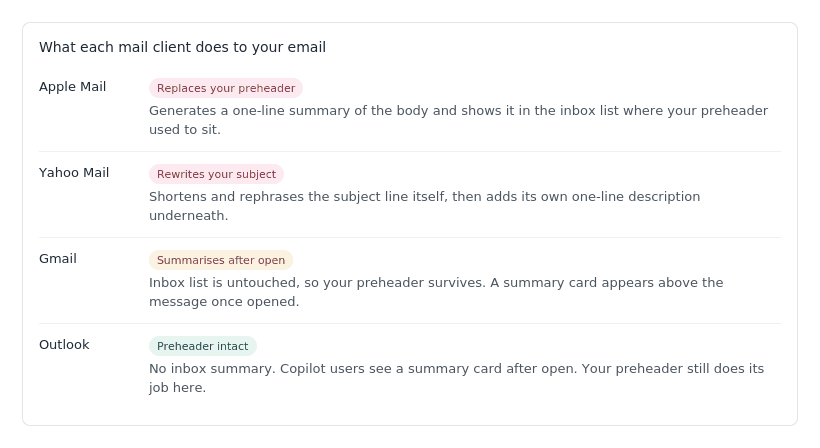
That is not a hypothetical. It is what Apple Mail does today on every iPhone with Apple Intelligence turned on. Yahoo goes further and rewrites the subject line itself. Gmail and Outlook are more polite about it, but they are summarising too.
Most marketers have not noticed yet, because you cannot see it in your own test sends unless you happen to open them on the right device. So here is what is actually happening, and what to do about it before your next campaign.
What the clients are doing
The summary is generated on the recipient’s device, from the readable content of your email. It is not pulled from a field you control. It is not your preheader. It is a fresh sentence written by a model that read your email and decided what it was about.
Each client handles it differently, which is the part that catches people out. Optimising for one of them does nothing for the others.
You cannot turn it off
This is the question everyone asks first, so let us settle it. There is no meta tag. There is no email header. There is no setting in your ESP, and there is no setting in ours. Apple and Yahoo have published nothing for senders, and nothing is coming that anyone has announced.
The summary happens after your email has left your hands and arrived on someone’s phone. As a sender you have exactly one lever, which is the content the summariser reads. That turns out to be a bigger lever than it sounds.
Notifications are where it hurts most
The inbox list gives the summariser room for a sentence. A lock screen notification does not. That is where details start disappearing, and it is usually the first thing your subscriber sees.
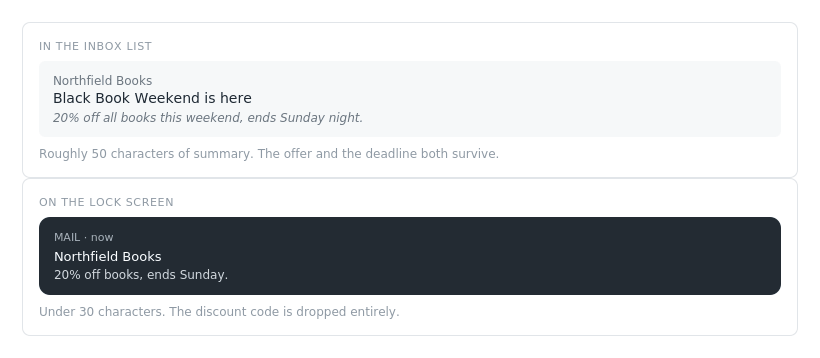
If your campaign hinges on a code, a deadline or a specific number, assume it gets cut at notification length unless it is doing serious work near the top of the email.
What the summariser actually reads
Here is the uncomfortable part for anyone sending image-led campaigns. The model reads live text. It does not read the words baked into your hero image. At best it reads your alt text, and most alt text is empty.

In the first version, the summariser has a brand name, a headline and a button label to work from. It will write something, and that something will be vague, because there is nothing specific to find. In the second version it has the discount, the deadline and the code.
The other thing worth knowing: the opening of the email carries far more weight than the rest. Roughly the first 200 characters of readable text do most of the work. Anything below that has limited influence on what gets written.
Five things to change in your next campaign
- Put the offer in live text, near the top. If “20% off until Sunday” only exists inside a JPEG, it does not exist as far as the summariser is concerned. One line of real text above the hero image fixes this.
- Write alt text as though it will be read aloud. It is the only way an image contributes anything. “Black Friday hero banner” is useless. “20% off every title until Sunday” is not.
- Use a real date, not a vibe. “This weekend” is not a deadline a machine can act on. “Until Sunday 30 November” is. This matters more every month, as assistants start extracting offers on people’s behalf.
- Keep writing preheaders. Outlook still shows them, Gmail still shows them in the inbox list, and plenty of people have Apple Intelligence switched off. You need both to read well.
- Send yourself a test and open it on an iPhone. Not the desktop preview. Not the ESP preview. The actual device, where the summary is generated. It takes two minutes and it is the only way to see what is happening.
Where this is going
Summaries are the visible edge of a bigger shift. More of your email is being read by software before a human sees it, and the software is starting to act on what it finds. Assistants pull out offers, codes and deadlines. Some of them will book, buy and remind on their subscriber’s behalf.
That means the same discipline pays off twice. An email written so a summariser can understand it is also an email an assistant can act on. Live text, clear offers, real dates, honest structure. None of that is new advice. It is just newly enforced.
We are building tooling inside VBOUT to make this visible while you are writing the campaign rather than after you send it. More on that when it is ready.
In the meantime, go open your last campaign on a phone. Whatever it says up there is what your subscribers actually read.
Don’t forget to share this article
Related articles
Nothing found.